
Orchestrating Predictive Maintenance: Building an MCP Agent with MATLAB and Python
January 21, 2026Predictive Maintenance with Multi-Tool Agentic Workflows
In this post, I’m using a Gemini agent to build an industrial health monitor application. By nesting the agent in a sprites.dev sandbox, I’ve got it orchestrating a hand-off between MATLAB (that is used for synthetic data generation) and Python (used for Vibration Analysis and health assessment) - all while keeping things smooth with a Zero-Copy Data Handoff strategy. By passing file paths instead of bulky data chunks, I reduce token usage and latency. If you've ever wondered how to integrate LLMs with industrial engineering tools like MATLAB, Python, Hadoop, and Parquet, you may find this blog relevant.
Architecting a Multi-Language Industrial Health Monitor Application
- My
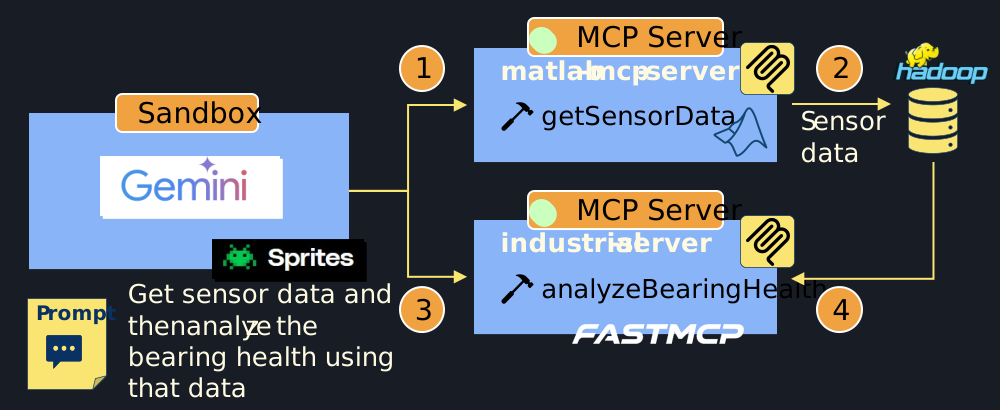
geminiagent (acting as the Lead Orchestrator) runs in the sprites.dev sandbox and connects to two specialized MCP servers. - The agent triggers a request to the
matlab-mcp-serverto retrieve measurement data from high-frequency sensors. - The
matlab-mcp-serverhosts thegetSensorDatatool. A MATLAB algorithm generates synthetic vibration signals and saves them to Hadoop HDFS storage as a Parquet file. The tool returns only the URL path (URI) to the data (preventing bulk data transfer back to the agent and saving precious context window tokens). - Once the
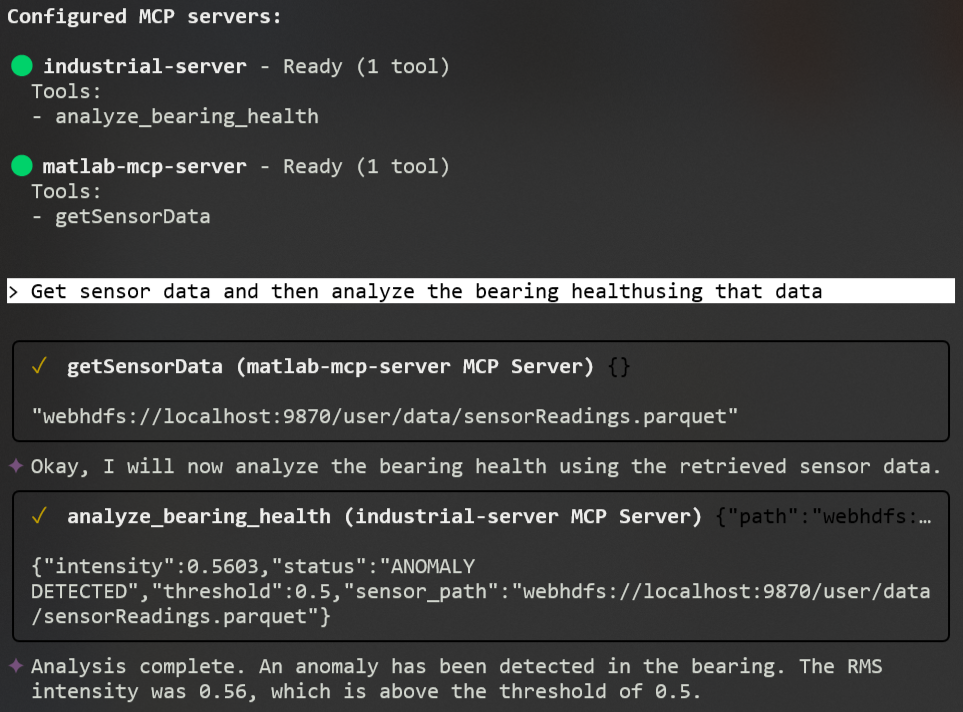
geminiagent receives the pointer to the data, it hands it off to theindustrialMCP server (using FastMCP). TheanalyzeBearingHealthtool runs a Python-based RMS intensity calculation at the 120Hz fault frequency to assess the bearing health state.
Sandbox Environments and Industrial Interoperability
I'm using sprites.dev as a stateful sandbox environnement. Sprites provide a pre-installed gemini-cli environment, which is ideal for testing Autonomous AI Agents in a safe, isolated container.
MATLAB MCP Server: Generating Synthetic Vibration Data
Here is my simple MATLAB algorithm to generate synthetic vibration data with random noise, which are then stored as Parquet files.
% Construct synthetic vibration signature:
% Component 1: 50Hz fundamental frequency
% Component 2: 120Hz higher-frequency fault harmonic
% Component 3: Random noise scaled by 0.5
sig = sin(2*pi*50*t) + 0.8*sin(2*pi*120*t) + 0.5*randn(size(t));

% --- Data Persistence ---
% Convert signal vector to a table for Parquet compatibility
% Variable name 'vibration' is used for schema consistency in HDFS
T = array2table(sig', 'VariableNames', {'vibration'});

% Write the file to the local working directory
parquetwrite(outPath, T);
Since MATLAB's parquetwrite supports HDFS out of the box, I could seamlessly share data between our MATLAB and Python.
Industrial Analysis Server: Bearing Health Assessment
The Pyhton's analyzeBearingHealth tool receives the path to the Parquet file, runs frequency-domain analysis, and judges the health state based on RMS intensity thresholds.
@mcp.tool()
def analyze_bearing_health(path: str, threshold: float = 0.5) -> dict:
    """
    Reads vibration data and judges bearing health based on RMS intensity at 120Hz.

    Args:
        path: URI or local path to the sensor data (Parquet format).
        threshold: RMS intensity limit (default 0.5).
    """
    # Load data from HDFS or local filesystem
    df = pd.read_parquet(path, engine='pyarrow')

    # Calculate intensity at the specific bearing fault frequency (120Hz)
    intensity = get_rms_at_freq(df['vibration'].values, fs=2000, target_freq=120)

    # Assess health and return the results ...