
Simulink to Cloud: Deploying Digital Twins with Docker and UDP
March 16, 2026Today, I’m building a Simulink model that I’ll deploy to a Dockerized environment and integrate with other components to build an application that will run 24/7. Although the model is simple, the architecture is a good starting point for building hybrid digital twins for predictive maintenance and monitoring applications. I’ll show you how to transform a Simulink model into a portable binary that acts as a lightweight live digital twin within a Docker composition.
My model is designed to run continuously in the cloud, using sensor data and control setpoints streamed externally via UDP. It processes the data and pushes the results to downstream Python services allowing users to monitor outputs through a dashboard and control the twin by adjusting setpoint value.
This is a classic blueprint for cloud-native digital twins featuring live data ingestion, high-fidelity physical models and IT deployment. I'm sharing the full overview, source code and an agent skill that you can use in the agentic application.
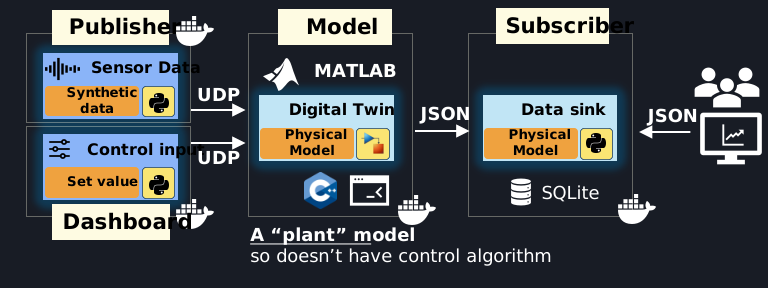
The publisher acts as a sensor data provider, continuously generating synthetic data and control input. The control input, which typically comes through a PLC in industrial settings, is provided manually via the dashboard. The Simulink model processes both the sensor and control inputs, then forwards the results to a subscriber, which stores data in a database. Finally, end users monitor the data through a real-time dashboard.
Simulink Model

The UDP_Sensor data is sinusoid data generated in Python and continuously streamed through UDP. The UDP_SetPressure is coming from dashboard and provided by user, and the digital twin subsystem computes the sum of the two input signals.
Embedded Coder and Simulink Coder are used to transform this model into C++ code with subsequent compilation into a binary. Once the binary is compiled, it is integrated into a docker image. Since I want to ensure the portability of my executable, I use a script to collect the neccesary dependencies, store them alongside the main executable, and load them during execution.
The speed at which data will be streamed to dashboard is controlled by pacing_rate parameter defined in the project-wide config.toml. The final executable, as well as its dependencies is hosted on GitHub.

Deployment into Docker Composition
To put all containers together I use docker compose where I point to pull Docker images that are built and hosted on GitHub. The docker compose up starts the entire stack and localhost:5000 hosts the dashboard.

Docker images that used in the stack and their total size:
IMAGE                                            ID             DISK USAGE   CONTENT SIZE   EXTRA
ghcr.io/samarkanov/udp-sse-dashboard:latest      0510147770b9        265MB           67MB
ghcr.io/samarkanov/udp-sse-digital-twin:latest   69e3a610ae71        260MB           79MB
ghcr.io/samarkanov/udp-sse-publisher:latest      b402b1427e89        259MB         65.8MB
ghcr.io/samarkanov/udp-sse-subscriber:latest     de72c2aaf22f        259MB         65.8MB
Agent skill
I created an agent skill for an end-to-end automation of a development workflow and tested it with the Gemini CLI, using this prompt:
I want to build a real-time Digital Twin from scratch. Please use the digital-twin-builder skill to guide the process. The project should include a MATLAB/Simulink model that generates a portable C++ binary, Python microservices for publishing/subscribing via UDP, and a Flask dashboard with Server-Sent Events. Set up Docker Compose and a GitHub Actions workflow for a 'Local Build -> Release Asset' deployment strategy.
Then the following steps were executed:
Source Code
The full source code, including the MATLAB scripts, Dockerfiles, and Python services, is available on GitHub:
https://github.com/samarkanov/Digital-Twin-UDP